 Domain RegistrationFind and register the perfect domain for your website.
 .COM DomainChoose a widely recognized domain to build global credibility.
 Domain TransferSeamless domain transfers with zero downtime and complete control.
 All TLDsFind and register your perfect domain. Choose from local and global extensions.
 SSL CertificatesKeep your website safe with reliable SSL Certificates that protect customer data and build trust.
 whoisCheck domain ownership details, expiration dates, and registrar information.
 US DomainRegister a .US domain and build trust in the USA.
 Web HostingEverything your website needs to run smoothly
 WordPress HostingWordPress hosting that just works
 Windows HostingReliable hosting for Windows environments
 Reseller HostingTurn hosting into your business
 Email HostingEmail that looks professional and works anywhere
 cPanel HostingFull control of your hosting with cPanel
 Affiliate ProgramJoin as a partner and earn commissions on every referral you send our way.
 Vps HostingScalable virtual servers that expand as you need.
 Dedicated ServersGet complete access and full control over your dedicated physical server.
 Managed vpsNot tech-savvy? We will take care of everything with our fully managed VPS hosting for you.
 AI Website BuilderCreate stunning websites in seconds with AI.
 Online ShopSet up a professional online store. No coding required.
 Web design serviceGet a tailored website designed to match your brand and support your goals.
 BlogFind helpful guides on web hosting, online selling, digital marketing, and more.
 Contact USYou can reach us anytime, day or night, through chat or email.
 SupportBrowse helpful guides and answers for all of our services.
Is your WordPress site keeping up with the times, or are you missing out on tools that could make your work twice as fast?
WordPress 6.9 dropped in December 2025, and it is one of the most practical updates the platform has released in years. No fluff. No gimmicks. Just real improvements that change how you build, write, manage, and collaborate on your WordPress website every single day.
You’re probably among many WordPress users who just upgrade without knowing what changed, so you never get to use the new features. Or you skip the update entirely and miss out on serious performance gains and built-in tools that could replace paid plugins.
This guide fixes that.
We will walk you through every major change in WordPress 6.9 now.
Here is what is covered:
- Collaboration features
- New blocks and content tools
- Editor and design improvements
- Template and theme updates
- Performance improvements
- Developer features
- Accessibility updates
- Command palette upgrades
- Whether you should upgrade
Let us get into it.
1) Collaboration Features
This is the headline of the entire release. WordPress 6.9 collaboration tools bring real teamwork directly inside the editor. No more back-and-forth emails. No more Google Docs for feedback. Everything happens in one place.
a) Block-Level Comments (Notes Feature)
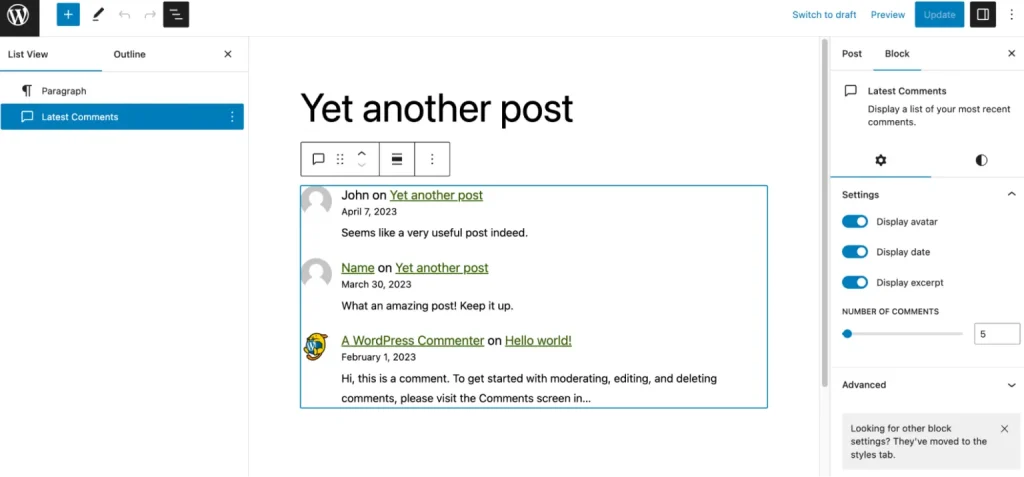
The new Notes feature lets you attach comments to specific blocks, a paragraph, an image, or a section, right inside the editor. Your comment sits right next to the content it refers to. Team members can reply in the same thread.
And here is the best part: the comment stays linked to that block even after you edit the content around it.
This is a giant leap for anyone working with writers, editors, or clients. Feedback is clear, it stays in context, and nothing gets lost in a long email chain.
b) Real-Time Collaboration
WordPress 6.9 real-time editing means the platform now detects when more than one person is working on a post at the same time. It shows you who is currently the editor. Autosave runs continuously, so no work is lost. And the revision history panel keeps a full record of every version, so you can always go back.
This prevents the classic problem of two people editing the same post and one person’s changes wiping out the other’s.
c) Full Editorial Workflow Inside WordPress
Put it all together, and you have a complete content workflow built into the platform. Writers are drafting while editors leave notes using the block comments system.
The revision panel lets you compare versions side by side. Post status controls, Draft, Pending Review, Published, keep everything moving in the right direction. User roles define who can edit, approve, or publish.
From first draft to live post, the entire process now happens inside WordPress 6.9 without needing a single third-party tool.
2) New Blocks in WordPress 6.9
The new WordPress 6.9 blocks reduce reliance on plugins for everyday content tasks. Each one solves a real problem.
a) Accordion Block
The Accordion block lets you create collapsible sections, content that expands when a reader clicks it, and hides when they do not need it. This keeps long pages clean and easy to read without cutting information out.
Perfect for a neat FAQ section.
b) Time-to-Read Block
This block automatically calculates and displays the estimated reading time for any post. It sets expectations for your readers before they start, which encourages them to stick around.
c) Math Block
If you run an educational site, a technical blog, or anything that involves equations, the Math block is built for you. You can now add properly formatted equations directly in the editor, no external plugin required.
d) Term Query Block
The enhanced Query Loop block now supports term filtering, which means you can display posts filtered by specific categories or tags dynamically. This makes it much easier to build organized, structured layouts without custom code.
e) Comment Count and Link Blocks
Two smaller but useful additions: a block that displays the number of comments on a post, and a structured link block for cleaner navigation. Both provide interaction signals and improve how readers navigate your site.
3) Editor and Design Improvements
The WordPress 6.9 block editor gets noticeably more flexible in this release. The changes are not dramatic, but they make daily design work faster and cleaner.
Spacing controls (margin and padding) are now easier to adjust at the block level. Typography settings give you more control over fonts and text styles without jumping between settings panels.
Layout controls help you keep page structure consistent across your site.
The Site Editor also gets improvements. The Global Styles panel lets you control colors, fonts, and layout for your entire site from one place. This saves time and keeps your design consistent without manually editing each page.
Block visibility settings are new, too. You can now hide specific blocks on the frontend without deleting them. Style variations give you more ways to customize how content appears on the page. More control, less clutter.
4) Template and Theme Improvements
WordPress 6.9 theme updates make the whole process of building and redesigning a site less risky.
The template editor now supports multiple templates that can be assigned to different pages. This gives you flexible design control across a complex site without fighting the platform to make it work.
The bigger improvement is template persistence when switching themes.
In previous versions, switching your theme could break your templates and wipe out layout work. In WordPress 6.9, templates survive a theme switch. This makes redesigning a site far safer than it used to be. You can experiment with a new theme without losing work.
The theme.json system that powers this has also been improved, giving developers and advanced users more control over how styles are inherited and applied across the site.
5) Performance Improvements in WordPress 6.9

WordPress 6.9 performance gets a meaningful upgrade in this release, and you will feel it in your load times.
The biggest change is on-demand CSS loading. Instead of loading every stylesheet your theme and plugins have, WordPress now loads only the CSS that is actually needed for the current page. That means lighter pages and less wasted code being sent to every visitor.
On the JavaScript side, script loading has been optimized to reduce render-blocking resources. Combined with improved lazy loading, this means pages start appearing faster, especially on mobile. These changes directly improve your Core Web Vitals, which affects how Google ranks your site.
6) Developer Features in WordPress 6.9
WordPress 6.9 developer updates are worth knowing even if you are not a developer, because they shape what is possible on your site going forward.
Three new APIs stand out:
The Abilities API adds support for AI-driven features inside WordPress. This is the foundation for automation tools that will grow in future releases. It prepares the platform for a smarter, more automated workflow.
The Interactivity API gets improvements that make dynamic content, content that changes without reloading the page, faster and more reliable. If you use interactive elements on your site, they will perform better in WordPress 6.9.
DataViews and DataForm tools make it easier to manage and display structured data directly in the dashboard. For developers building custom post types or data-heavy sites, this is a significant quality-of-life improvement.
The block system itself has also been updated with a cleaner development structure, giving developers more flexibility to build custom features without fighting the core platform.
7) Accessibility Improvements
WordPress 6.9 accessibility updates make the platform easier to use for everyone, including people who rely on assistive technology.
Screen reader support has been improved across the editor. Keyboard navigation is more reliable, with better focus management that keeps users oriented as they move through the interface. Interaction feedback, the visual and functional cues the editor gives when you take an action, has been cleaned up for a more consistent experience.
These changes apply to the editor itself, which means they benefit anyone building or managing a site, not just end users. A more accessible editor is a faster, cleaner editor for everyone.
8) Command Palette
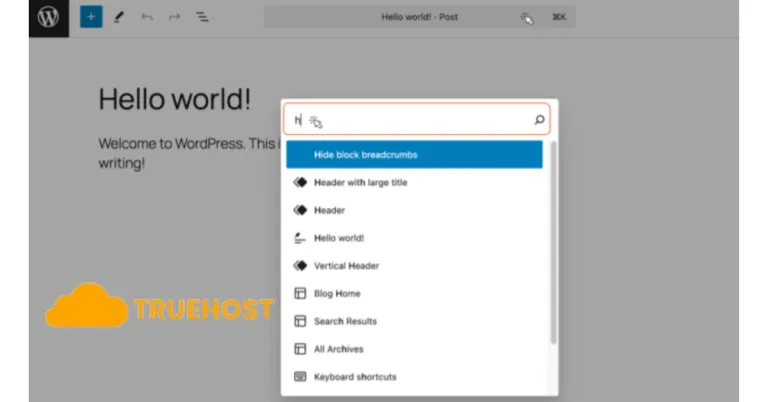
If you have not used the Command Palette in WordPress before, WordPress 6.9 is a great time to start.
The Command Palette lets you search for and run actions instantly, without hunting through menus. In this release, it has been expanded with more commands covering more areas of the editor and dashboard.
Want to switch a template, change post status, or jump to a settings panel? Type it in the Command Palette and go.
The result is fewer clicks, faster navigation, and a workflow that actually keeps up with you. For anyone managing a busy site or publishing frequently, this is one of those features that becomes essential once you start using it.
How WordPress 6.9 Helps You Day to Day
Pull all of this together, and the picture is clear. WordPress 6.9 features are built around making your daily work faster and simpler.
- Your teams coordinate better with real-time collaboration and block comments.
- You get to publish content faster with a full editorial workflow inside the platform.
- You need fewer plugins because the blocks cover more use cases than before.
- Pages load faster thanks to CSS and script optimization.
- And the editor is more flexible without becoming more complicated.
Should You Upgrade to WordPress 6.9?
Short answer: yes. But do it the right way.
You will benefit from updating to WordPress 6.9 immediately. The performance improvements alone are worth it. But before you hit update, take two minutes to back up your site. This protects you if any plugin or theme has a compatibility issue with the new version.
After backing up:
- Update WordPress core first
- Then update your plugins and themes
- Check your site on both desktop and mobile after each update
The vast majority of well-maintained sites will update without a single problem. The backup is just a safety net, and it is always worth having one.
Why Truehost Is a Strong Choice for Hosting WordPress 6.9
The best version of WordPress 6.9 runs on hosting that is built to support it. Truehost is optimized specifically for WordPress performance, fast server response times, reliable uptime, and an easy setup process that gets your site live without technical headaches.
All the performance improvements in WordPress 6.9 work better on a fast, stable server.
Truehost makes sure nothing on the hosting side holds your site back.
In Summary
WordPress 6.9 is a genuinely useful release.
- Real-time collaboration
- Smarter blocks
- Better performance
- Cleaner design tools
- More accessible editor
Every change solves a real problem that real users face.
You do not need to be a developer to take advantage of it. Back up your site, run the update, and start using the features that make your workflow faster. The improvements are there. You just have to turn them on.
For the best performance with WordPress 6.9, pair it with hosting that keeps up. Choose Truehost. Head to our website and get your WordPress site running at full speed from day one.