 Domain RegistrationFind and register the perfect domain for your website.
 .COM DomainChoose a widely recognized domain to build global credibility.
 Domain TransferSeamless domain transfers with zero downtime and complete control.
 All TLDsFind and register your perfect domain. Choose from local and global extensions.
 SSL CertificatesKeep your website safe with reliable SSL Certificates that protect customer data and build trust.
 whoisCheck domain ownership details, expiration dates, and registrar information.
 US DomainRegister a .US domain and build trust in the USA.
 Web HostingEverything your website needs to run smoothly
 WordPress HostingWordPress hosting that just works
 Windows HostingReliable hosting for Windows environments
 Reseller HostingTurn hosting into your business
 Email HostingEmail that looks professional and works anywhere
 cPanel HostingFull control of your hosting with cPanel
 Affiliate ProgramJoin as a partner and earn commissions on every referral you send our way.
 Vps HostingScalable virtual servers that expand as you need.
 Dedicated ServersGet complete access and full control over your dedicated physical server.
 Managed vpsNot tech-savvy? We will take care of everything with our fully managed VPS hosting for you.
 AI Website BuilderCreate stunning websites in seconds with AI.
 Online ShopSet up a professional online store. No coding required.
 Web design serviceGet a tailored website designed to match your brand and support your goals.
 BlogFind helpful guides on web hosting, online selling, digital marketing, and more.
 Contact USYou can reach us anytime, day or night, through chat or email.
 SupportBrowse helpful guides and answers for all of our services.
Here’s what bad hosting does to your business. It slows down your site; customers click your link, wait…and wait, then they leave. You lose a sale, and you don’t even know it happened.
You signed up for shared hosting because it was cheap and easy…and that was the right call when you started. But as your site grows, shared hosting starts to hold you back.
- Pages get slower.
- Your site goes offline at the worst times.
- Sales drop.
The good news? There’s a clear point when leaving shared hosting makes sense. And there’s also a point where you should stay put and save your money.
Here’s what this article covers:
- What shared hosting is and how it works
- When to leave shared hosting
- Why upgrade from shared hosting
- When shared hosting is still totally fine
- How to upgrade your host without breaking your site
- Common mistakes leaving shared hosting
Let’s walk through it.
What Is Shared Hosting?
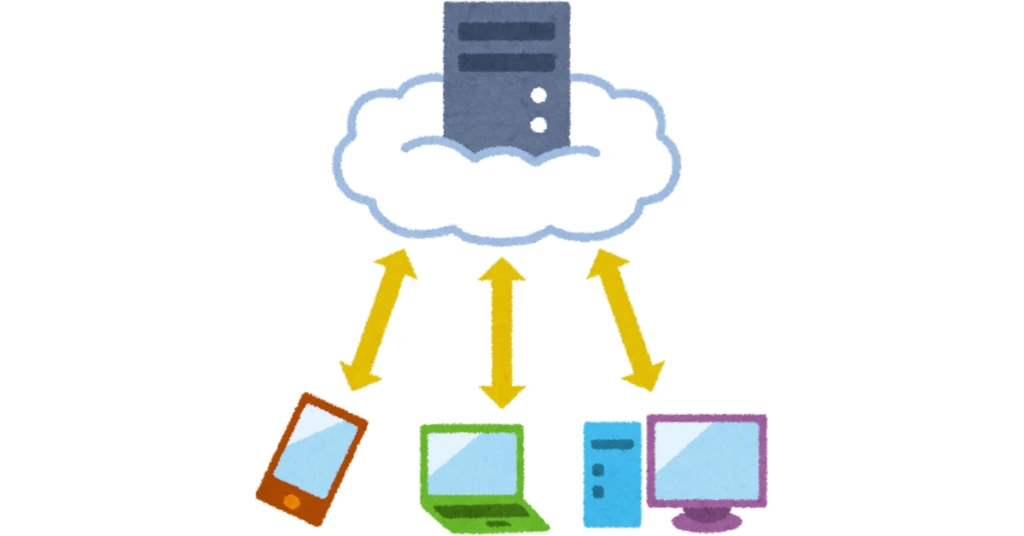
When you purchase shared hosting, your website resides on a large computer called a server. But you’re not alone on that server. Hundreds of other websites are on it too. You all share the same power, memory, and space.
Think of it like sharing a pizza with a group of friends. If one person takes five slices, everyone else gets fewer. On a shared server, if one website gets a huge rush of visitors, it uses up more power, and your site gets slower because of it.
Why It’s Popular
Shared hosting is popular because it’s cheap. Plans start at around $1.50 a month. It’s also easy to set up. You don’t need to know anything technical. Everything is already set up for you.
That’s why shared hosting is a great place to start. It works well when your site is new or small. The problems start when you grow… and that’s exactly when leaving shared hosting becomes the right next step.
When to Leave Shared Hosting
1) Traffic Keeps Growing
Every time someone visits your website, it uses a little bit of the server’s power. Shared hosting handles that fine when you have a small number of visitors. But once you start getting more than 15,000 to 30,000 visitors a month, the server starts to struggle.
And if you run a sale, post something that goes viral, or get a busy season rush, the traffic spike can hit all at once. Your shared server can’t keep up.
- Your site goes offline.
- Your customers see an error page.
That’s the moment leaving shared hosting goes from “something to think about” to “something you need to do now.”
2) Speed Drops
You notice your pages are taking longer to load. They used to open in one or two seconds. Now it’s four or five. That’s not a small thing.
Google tracks something called Core Web Vitals. These are scores that measure how fast and smooth your site feels. When your shared server gets overwhelmed, these scores go down. And when your scores go down, Google pushes your site lower in search results.
Fewer people find you. Fewer people buy from you.
On top of that, a two-second delay in loading time pushes your bounce rate up by 103%. That means more than half the people who click your link leave before they even read anything. All because the page was too slow.
3) Resource Limits Hit
Your shared hosting plan gives you a set amount of power, memory, and data. These are called CPU, RAM, and bandwidth. When you use up all of what you’re given, your hosting company slows your site down or takes it offline until the next day.
If you log into your hosting dashboard and see warnings about high CPU or RAM use, or if you run out of bandwidth before the month is over, your plan is too small for your site. You’ve hit the wall.
4) Downtime Increases
Every website goes offline sometimes. That’s normal. But if your site is going down more than once or twice a month, especially during busy times, that’s a hosting problem, not bad luck.
Here’s why this hurts your wallet:
According to Pingdom, small businesses lose between $137 and $427 every single minute their site is down. Every minute your checkout page is offline is money you’re not getting back. If your site goes down during a big sale or campaign, that’s a very expensive problem.
5) Sales Slip
Your cart page takes forever to load. The checkout button stops working. A customer tries to pay, and the page freezes. They give up and buy from someone else.
These aren’t random glitches. They happen when your server is overloaded. The pages that need the most power, that is, your cart, checkout, and payment pages, are the first ones to break when your hosting can’t keep up.
And once that happens, 88% of customers won’t come back. One bad experience is enough for most people to move on.
6) Security Risks Rise
On a shared server, you’re sharing more than just power. You’re sharing an IP address. The web address that identifies your server.
If another website on your server gets hacked or starts sending spam, your IP address gets marked as dangerous. Google can flag your site. Your emails can end up in spam. None of that is your fault, but you pay the price for it anyway.
You also have very little control over security settings on a shared server. You can’t set your own firewall rules or block suspicious traffic. With 43% of all cyberattacks targeting small businesses, limited control is a real risk. Leaving shared hosting and moving to your own server gives you a wall between your site and everyone else’s problems.
7) Support Feels Limited
Shared hosting support is built for simple problems.
Forgot your password? They can help. Need to reinstall WordPress? No problem.
- But what if your site is slow and you don’t know why?
- What if your database keeps crashing?
- What if you need your server set up in a specific way?
Shared hosting support teams often can’t help with those things. If you keep sending support tickets and getting back answers that don’t fix the problem, or if you wait more than a day for a reply, your hosting plan has run out of support options for the kind of site you now have.
8) Custom Needs Grow
Maybe you’re running a big online shop with hundreds of products. Maybe you have a membership site where lots of people log in at the same time. Maybe you need a specific type of software installed on your server.
Shared hosting doesn’t let you do most of that. You can’t install your own software. You can’t change how the server is set up. You work with what they give you.
When your site needs more than what shared hosting offers, leaving shared hosting is the only way forward.
Why Upgrade From Shared Hosting
A) Stability Improves
When you move to a VPS (Virtual Private Server), you get your own slice of a server. Your power, memory, and storage are yours. No one else can use them.
That means when another website gets a huge wave of visitors, nothing changes for you. Your site stays fast and online no matter what your neighbors are doing. Your site loads in 1.2 seconds at midnight and still loads in 1.3 seconds on your busiest afternoon.
That kind of consistency builds trust with your customers.
B) Speed Increases
A VPS gives your site more power to work with. Pages load faster. Your server responds more quickly. You also get to choose settings that make your site even faster, like caching and database optimization, which shared hosting simply doesn’t allow.
Data shows that a page loading in one second converts three times more visitors into buyers than a page loading in five seconds. Faster hosting directly puts more money in your pocket.
You can actually check this yourself in Google Analytics after you upgrade.
C) Control Expands
On shared hosting, you play by the hosting company’s rules. You get what you get. On a VPS, you’re in charge. You pick your settings. You install what you need. You set up your server the way your site requires.
That level of control becomes important as your site gets bigger and more complex. You stop being limited by someone else’s rules and start making decisions that are right for your site.
D) Security Strengthens
On a VPS, your site sits in its own space. You don’t share an IP address. You don’t share anything with other websites. If someone else gets hacked, it doesn’t affect you at all.
You also get to set your own security rules. You can block certain types of traffic, set up alerts for suspicious activity, and control exactly who can access what. If you take payments or store customer information, this level of security is necessary.
E) Traffic Spikes Get Absorbed
When you run a promotion or get a sudden wave of visitors, a VPS handles it without blinking. Your site stays fast and online. You don’t lose customers because your server couldn’t keep up during the one moment you needed it most.
F) Growth Gets Supported
As your business grows, your hosting grows with you. You can add more websites, handle more visitors, and launch new features without hitting a wall. You add what you need when you need it, instead of scrambling after things break.
G) Reputation Stays Intact
Every time your site goes down in public, customers notice. They don’t think “it’s just a temporary issue.” They think “this business isn’t reliable.”
Leaving shared hosting at the right time means you stop giving customers a reason to doubt you.
When Shared Hosting Is Still Enough
Leaving shared hosting isn’t always the right move. Here’s when you should stay:
You run a small local business site with a few service pages and a contact form. If you’re getting fewer than 10,000 visitors a month, shared hosting handles you just fine.
You’re just starting out and still testing your idea. Don’t upgrade before you know what you’re building. Get clear on your business first, then think about hosting.
You run a blog or content site with steady, low traffic under 15,000 monthly visits. If your site loads fast and stays online, there’s no reason to pay more.
The simple rule: if your site loads fast, stays online, and you have no complaints from customers about speed or errors, stay where you are
How to Upgrade Your Host Without Breaking Your Site

Leaving shared hosting goes smoothly when you follow these steps. Skip them, and things can go wrong.
a) Check Resources First
Log in to your hosting dashboard and look at your CPU use, RAM use, and bandwidth for the last 30 days. If you’re hitting 70–80% or more regularly, you need more power. If you’re only at 30%, the problem might be a slow plugin or messy code… not your hosting.
Fix the code before you pay for a bigger plan.
b) Plan Migration Carefully
Before you change anything, back up your full site, your files, your database, and your email. Many VPS providers will move your site to the new server for you. That’s called managed migration.
Use it if you can. If you’re doing it yourself, only switch your domain over after you’ve confirmed the new server is working properly.
c) Test Before Launch
Set up a copy of your site on the new server, called a staging site. Run it through a speed test using GTmetrix or Google PageSpeed Insights. Click through every page, every form, and every checkout step.
Make sure everything works before you flip the switch. Rushing this step is how sites go down at the worst possible time.
Common Mistakes When Leaving Shared Hosting
Here are three mistakes you want to avoid:
Upgrading too early means paying $20–$80 a month for a VPS when your shared plan is still handling everything fine. Check your actual numbers before you commit.
Waiting too long means your customers are already leaving because your site is slow or keeps going down. By the time you hear complaints out loud, a lot of people have already left without saying a word. Watch your numbers, don’t wait for a crisis.
Picking a new host with weak support is a mistake you’ll regret. A VPS has more moving parts than shared hosting. When something goes wrong, you need real help fast. Make sure your new host offers 24/7 support from people who actually know servers.
Final Decision Framework
Stay on shared hosting if:
- You get fewer than 15,000–20,000 visitors a month
- Your pages load in under three seconds
- No warnings show up in your hosting dashboard
- Your customers aren’t complaining about speed or errors
Start leaving shared hosting and move to VPS if:
- Your site keeps getting slower, even after fixing plugins
- Your sales depend on staying online
- Your traffic is growing every month
- You keep seeing CPU or RAM warnings
- You want your site in its own secure space
Leaving Shared Hosting Take Away
Shared hosting is a great place to start your website. It’s cheap, simple, and it works well when you’re small. But leaving shared hosting at the right time is what keeps your business moving forward.
When your site gets slow, goes down too often, or starts costing you sales, staying on shared hosting costs you more than upgrading ever would.
Keep an eye on your traffic, your page speed, and your hosting dashboard. When two or more warning signs show up at the same time, that’s your cue to move.
Already seeing the signs? Truehost offers VPS and managed hosting upgrades that move your site over for you. Check your options on our website now.